Trading Partner Help
- An Interchange based search from any screen by hitting the F-key and entering the part type and interchange number into the dialog box and pressing Enter.
- A Non interchange part search from any screen by hitting the F-key and enter. This will display a page which will allow you to enter the part information for your non-interchange search.
|
Interchange Search
|
|
|
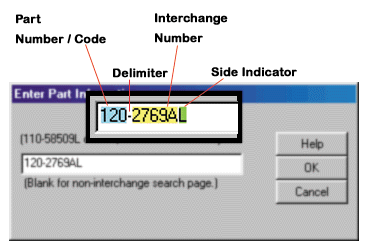
Directions for Dialog data entry:
Enter Part Number and Interchange
then Press Enter or click OK.
These two numbers must be delimited, or separated, with a space (‘ ‘), a dash (‘-‘) or a comma (‘,’) The part number must be a valid Checkmate®*
(3 digit Alpha), Hollander®# (3 digit numeric) or Pinnacle®# (two
digit Alpha) part number. All are case insensitive.
The interchange must be 3 to 8 characters
alpha numeric, case insensitive.
If a part requires a right or left
distinction the character R or L should be added to the end of the interchange
number. It need not be appended for Pinnacle part numbers.
|
 |
|
Non Interchange Search
|
|
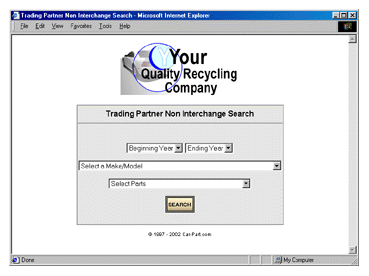
| Leave dialog box empty and Press Enter
or click OK. The follow page will display where part information
can be selected. When form completed, click the Search button. The
results of this search will be the exact Year or range of years, Model,
and part selected.
note: A single year or range of year can be selected., |
 |
|
Trading Partner Users Guide
|
| Click Here for a complete online Car-Part.com Trading Partner Users guide. |
* Trademark of CCITRIAD, not
affiliated with Car-Part.com
# Trademarks are property
of their respective owners and are not affiliated with Car-Part.com
©1997-2003 Car-Part.com