|
This page is an archive of previously-published content. The information was accurate at the time it was published; however, the information may no longer be accurate or complete. If you have any questions about current Car-Part products, please contact your sales or support rep.
|
|
Do you have questions about your business?
|
- What vehicles/part types have been most profitable for me?
- Which highly requested parts do I need?
- Which vehicles should be crushed?
- How much do I need to pay in sales commissions?
|
Checkmate has a ton of reports. This email highlights some of the most popular reports that can make a big impact on decision-making at your business. These reports are all designed to give you the insights you need to make smarter decisions and boost your bottom line. Start using them today to drive your business forward!
- If you have these Checkmate reports, you can use the search bar in Checkmate Reports to locate and learn more about any of these reports. Click on the report, and check out the information that displays to the right.
|

|
|
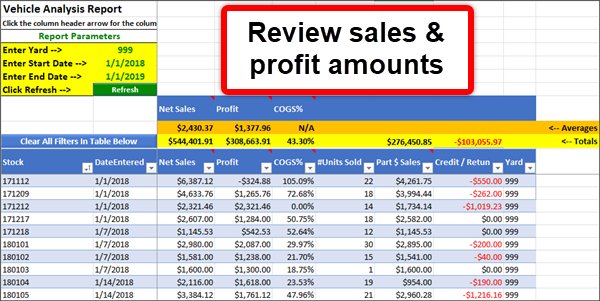
Vehicle Analysis Report: What vehicles are most profitable for me?
Make sure you're buying the right vehicles, and handling them in the right way. This report answers questions, like:
- what vehicles have been most profitable for me?
- what sources tend to provide top-performing vehicles?
- which vehicles have had the value extracted already, and are ready to crush?
Pro Tip: Run the report for a timespan of several months to see what's been working for you lately, or run it for several years to identify overarching trends.
|
Hot Sellers Report: Which parts sell best at my business?
With this report, it's easy to see which part types sell best for you. Then you can use the filters to drilldown to see which parts have high sales requests but low or no quantity on hand.
|
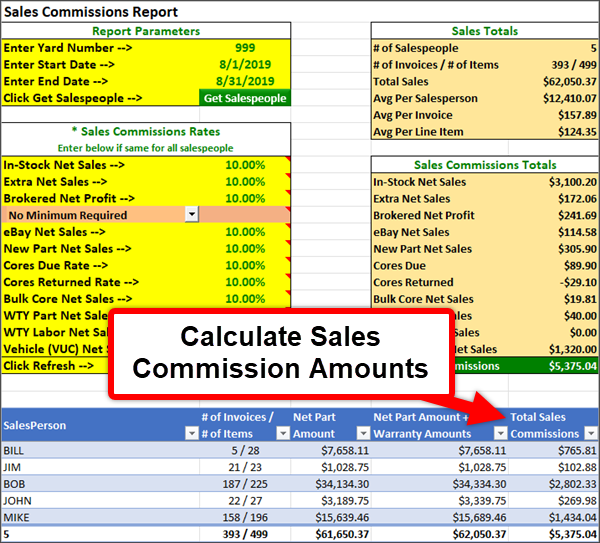
Sales Commission Report: How much commission do I pay?
This report calculates sales commissions for you, making it easy to accurately track and reward your sales team.
|
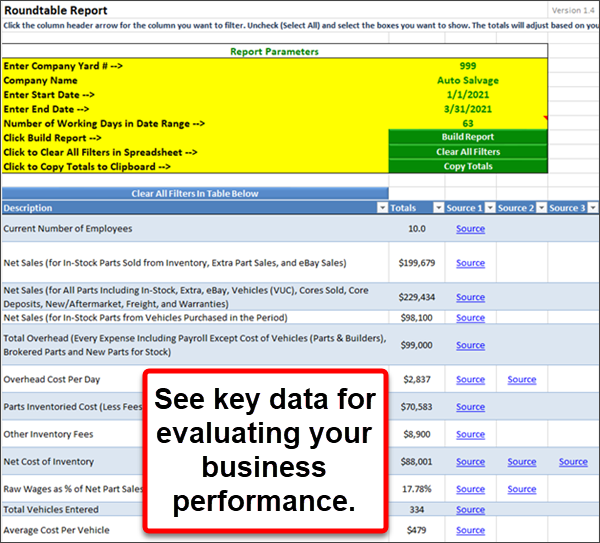
Roundtable Report: What is my overall business performance?
This report is designed for participants of Recycler Executive Roundtables, but it's useful for anyone who wants to see a comprehensive view of their business on 1 report. It provides quarterly information.
In addition to insights into overall business performance, it shows you overhead information per item sold, which can help you identify parts that cost you more to process than you make selling them.
|
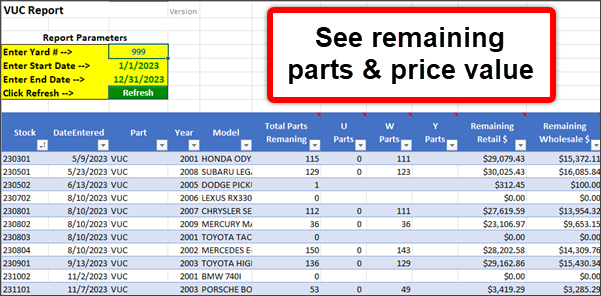
VUC Report: Which vehicles are ready to crush?
VUC means "Vehicle Unit Complete" and refers to the physical vehicles you currently have at your business. This report is all about vehicles: see how many parts are left on your vehicles, the retail and wholesale value of the remaining parts, projected sales, and sales and credits so far. All this helps you figure out when it's time to crush a vehicle.
|
|
*Report images cropped for demonstration purposes. Actual appearance of reports may differ.
Invoice Line Item Detail Report: Have a question about a transaction?
If you have questions about a sale, take a look at this report. It's a great resource for looking into any details about a particular invoice. It has details about the customer, part, brokering, purchase order, warranties, cores, and more!
|
New to Microsoft Excel?
All of the reports mentioned here are used in Microsoft Excel. But don't worry, you don't have to know how to use Microsoft Excel to use these reports! Running most of these reports is as easy as selecting dates and another option or two, and clicking a button. Additionally, each report has a tab with directions for using the report, if you need it.
We also have a video that tells you everything you need to know about using these reports. The button below takes you to the Checkmate Reports training page.
|
On that page, under Tutorials/Videos, look for:
How to Use Excel Reports
The video is password-protected- if you don't have a username or password, your support tech can assist you!
|
|
Later this week, Car-Part.com marketplaces (including Car Part Pro and individual recycler websites) will be updated to Car-Part Interchange version 91.2. We will email you again when this is done.
|
|
Reno, NV
February 20-21, 2026
Booth
Car-Part Speakers:
- Theresa Colbert
- Mendi Evans
|
|
© 2025 Car-Part.com. All rights reserved. All trademarks are the properties of their respective owners.
|
|
|
|
|
|